So hey.....I have sort of been ignoring this site.......I have been focusing on other things. One of this is my new site GeekRaves. I know I spoke about it back in 2010 and said it would open in December...I lied. But it is for the best. It has evolved alot since my first idea. Originally it was just this, but with a proper site. I know you all would love that :)!!! ......yea no. I should be announcing it soon but it will be awesome. It is just being created by my awesome designer. It is sort of half done and looks AMAZING so far.
I am looking forward to unveiling it:)
AndrewCow
Saturday, June 18, 2011
Saturday, October 16, 2010
Tuesday, October 12, 2010
Windows Phone 7

Big news for the mobile industry as mega-company Microsoft starts their press conference on Windows Phone 7. It is believed the company will show hardware from companies such as HTC, Samsung and LG. There are reports that details of the phones have already been leaked on the Windows Phone 7 website.
The new operating system has already been shown off earlier this year to a positive reception from the technology industry. Microsoft is hoping for their operating system to become the next big thing, overtaking the current top operating systems Android and iOS.
AndrewCow

Wednesday, October 6, 2010
YeaNo
Labels:
apple,
crap,
geek,
iPhone,
iPhone 4,
ravings,
technogeek
1 comments
Ok.
I know I said I would post my iPhone 4 review but I changed my mind. I decided it was so crap that I would remake it. So yea...next Monday...I should have something else up on Friday.
Till next time
AndrewCow
I know I said I would post my iPhone 4 review but I changed my mind. I decided it was so crap that I would remake it. So yea...next Monday...I should have something else up on Friday.
Till next time
AndrewCow
Monday, October 4, 2010
Top 10 Non-game Apps
Labels:
app,
apple,
authenticator,
facebook,
flashlight,
foxtel,
iOS,
iPhone,
store,
ten,
top,
tweetdeck,
twitter,
USB,
warcraft,
world,
wow
1 comments
Hey
I have finished my iPhone 4 review and it is sitting on my computer so i'll upload it tonight:) In the meantime, here is my top 12 non-game iOS apps. It was going to be 10 but then I could not decide. All of these apps are free by the way, or at least have free version.
1. Currency - this app might not interest everyone but it provides a simple, easy to use overview of any currency in the world.
2. Facebook - once again, not for everybody but come on. Who under 80 does not have Facebook.
3. Flashlight (icon below)- even if you don't have an iPhone 4, this app can be very useful. Flashlight allows you to use the flash as a torch or a strobe light. It also lets you turn the screen white like many other apps. If you do not have an iPhone 4 I recommend an app called flashlight (its icon has a green background with a torch on it) which allows you to turn the screen any colour. Turning it white illuminates anything.
4. TweetDeck - if you use twitter, you will live this app. It provides an excellent column view as well as a great interface for writing tweets and even connecting to Facebook.
5. Foxtel Guide - This is useless for you if you do not have Foxtel but if you do it is a must. It lets you record from anywhere in the world. If you have two boxes through multiroom you can even select which one to record on. Although this is only for Australia, i'm pretty sure cable networks in other countries have apps similar to this one including TiVo.
6. Authenticator - Only useful if you play World of Warcraft but if you do, it lets you use your phone as a Remote Authenticator, which prevents hacking.
7. USB Disk - This allows you to do what you can't with an iPhone of any kind, use it an a USB like you can with iPods...sort of. It only works if you have iTunes on both computers, but you can load any file on to it through iTunes, view it on your iPhone, then offload it on another computer.
8. Remote - This Apple application, not pre-installed simply allows control of your iTunes library from anywhere in your house, as long as you have iTunes.
9. PandoraBox - Its a bit complicated to use, but if you can it is great, and could save you a lot on money. It shows free apps that are free for a limited amount of time. Just go On Sale(down the bottom) then click free(up the top).
10. Consume - this app can be a tad buggy at times but it shows data usage and call usage for many networks.
11. Snow Report - useless if you are not interested in skiing but if you are it provides unprecedented coverage of slopes all over the world.
12. Sound Hound - this app lets you identify not only recorded songs, but also that one stuck in your head when you sing it. Its free version lets you identify only a couple of songs per month but for most people, this is enough.
A friend also told me to mention Eurosport and iFittness, which will cater for all your sports news and workout plans respectively.
So till next time
AndrewCow

Thursday, September 30, 2010
Top 10 Game Apps
Labels:
app,
app store,
apple,
apps,
dactyl,
fruit,
Guitar,
hero,
iPhone,
iPhone 4,
lighsaber,
line,
ninja,
rider,
store,
tilt,
to live,
top
1 comments

Friday, August 27, 2010
Best Game Trailers Ever
Labels:
cataclysm,
deus,
ex,
game,
halo,
human,
king,
lich,
machinima,
medieval,
of,
reach,
revolution,
sims,
the,
trailer,
trailers,
warcraft,
world,
wrath
1 comments
Hi
So the other day, I was watching a couple of awesome game trailers. It got me thinking, what are the best I have ever seen? These are my top 5, not in order though. Leave your favourites in the comments below :)
The first, although technically not a trailer, was released before the game was and therefore counts as one...to me:)
Well....here are the others
I saw this one just earlier today... and what can I say. It looks utterly amazing!
I thought I would add this one. The funniest game trailer I have ever seen!:)
Thanks everyone
AndrewCow
So the other day, I was watching a couple of awesome game trailers. It got me thinking, what are the best I have ever seen? These are my top 5, not in order though. Leave your favourites in the comments below :)
The first, although technically not a trailer, was released before the game was and therefore counts as one...to me:)
Well....here are the others
I saw this one just earlier today... and what can I say. It looks utterly amazing!
I thought I would add this one. The funniest game trailer I have ever seen!:)
Thanks everyone
AndrewCow
Monday, August 23, 2010
Security
Labels:
amplify,
ATT,
blocker,
cell,
fake,
information,
las vegas,
phone,
security,
signal,
steal,
stealing,
tower
0
comments
Hi
If you didn't know, some people are scary. I am not trying to spook you out of the Internet or buying things online, I do it all the time. Just be careful.
So about a month ago, there was the world security conference where lots of people display scary life destroying technology. Luckily, there are all expert defenders of the innocent, just creating proof of concept things to keep people on guard. There were many terrifying devices, but none more than, well basically a mini cell phone tower. It takes the cell phone signal that would normally be beamed directly to your phone, and magnifies it. Now that does not sound so bad, even useful. The scary thing is, it tricks your phone to connect to it, no matter what...then steals all your data and information. This is done using a combination of a signal blocker and the crazy signal amplifier/ information stealer the guy invented.
So what sort of information can this thing steal about you. Well firstly, details of your account with the telco provider you have. This may even allow them to access your credit card.After that, basically anything on your phone, maybe more depending on how you use your phone.
So yea..........the tech world is a scary place
See you next time
AndrewCow

If you didn't know, some people are scary. I am not trying to spook you out of the Internet or buying things online, I do it all the time. Just be careful.
So about a month ago, there was the world security conference where lots of people display scary life destroying technology. Luckily, there are all expert defenders of the innocent, just creating proof of concept things to keep people on guard. There were many terrifying devices, but none more than, well basically a mini cell phone tower. It takes the cell phone signal that would normally be beamed directly to your phone, and magnifies it. Now that does not sound so bad, even useful. The scary thing is, it tricks your phone to connect to it, no matter what...then steals all your data and information. This is done using a combination of a signal blocker and the crazy signal amplifier/ information stealer the guy invented.
So what sort of information can this thing steal about you. Well firstly, details of your account with the telco provider you have. This may even allow them to access your credit card.After that, basically anything on your phone, maybe more depending on how you use your phone.
So yea..........the tech world is a scary place
See you next time
AndrewCow
Monday, August 16, 2010
White iPhone
Labels:
3G,
antenna,
antennagate,
apple,
black,
gelaskins,
iPhone,
iPhone 4,
iPhone 4G,
iPhone HD,
issues,
jobs,
lag,
lagging,
proximity sensor,
steve,
steve jobs,
white
0
comments
Hey
So you may wonder what ever happened to the white iPhone 4. There are pictures of it sitting there in all its awesomeness on the apple website, but when you go and order it, you get a message like the one shown below. Now Apple has been very quiet about this but the never ending leaks on the product continue. Maybe Apple should use the money the gained from firing their head of engineering over the "Antennagate" scandal to hire a plumber.
Apparently (i have noticed I am starting to use this word a lot) they are finding it very hard to stop the screen's back light shining through the front panel of the phone. You may not really get what I mean but if you have ever seen a MacBook, you would. In the laptop's case, Apple utilizes the back light as not only a....well....back light, but also to light the Apple logo on the reverse side of the screen. In the case of the iPhone 4, this would cause the phone to glow like a Christmas tree.
The interesting thing about this reason is that functional white iPhone 4s do exist. Apple some employees have been given them. Most likely, these are hand made devices built at the headquarters in California. In silicone valley, not suicide valley(if you did not get that joke, the company that makes the iPhone, Foxconn, has had 13 suicide attempts in five months). But I digress with my tasteless jokes. Basically, there must be some way to make the phones not bleed light, because Apple is doing it. I'm guessing though there is something expensive about it that is not feasible in mass production.
Another theory states, this delay is just so they have time to re-engineer the antenna. Apple has really not had luck with this product launch. Not only was there is delay in white iPhone, but also reported problems with a batch of phones proximity sensor(the thing that makes the screen turn off when it is close to your face) as well as the terrible lagging experienced by users of iOS4 on the original 3G...like me....
In any case, I will have my iPhone 4 soon and then be happy. I have already ordered some really cool cases and I recommend you check them out HERE. They are truly amazing unique things.
Thanks for reading:)
AndrewCow
So you may wonder what ever happened to the white iPhone 4. There are pictures of it sitting there in all its awesomeness on the apple website, but when you go and order it, you get a message like the one shown below. Now Apple has been very quiet about this but the never ending leaks on the product continue. Maybe Apple should use the money the gained from firing their head of engineering over the "Antennagate" scandal to hire a plumber.
Apparently (i have noticed I am starting to use this word a lot) they are finding it very hard to stop the screen's back light shining through the front panel of the phone. You may not really get what I mean but if you have ever seen a MacBook, you would. In the laptop's case, Apple utilizes the back light as not only a....well....back light, but also to light the Apple logo on the reverse side of the screen. In the case of the iPhone 4, this would cause the phone to glow like a Christmas tree.
The interesting thing about this reason is that functional white iPhone 4s do exist. Apple some employees have been given them. Most likely, these are hand made devices built at the headquarters in California. In silicone valley, not suicide valley(if you did not get that joke, the company that makes the iPhone, Foxconn, has had 13 suicide attempts in five months). But I digress with my tasteless jokes. Basically, there must be some way to make the phones not bleed light, because Apple is doing it. I'm guessing though there is something expensive about it that is not feasible in mass production.
Another theory states, this delay is just so they have time to re-engineer the antenna. Apple has really not had luck with this product launch. Not only was there is delay in white iPhone, but also reported problems with a batch of phones proximity sensor(the thing that makes the screen turn off when it is close to your face) as well as the terrible lagging experienced by users of iOS4 on the original 3G...like me....
In any case, I will have my iPhone 4 soon and then be happy. I have already ordered some really cool cases and I recommend you check them out HERE. They are truly amazing unique things.
Thanks for reading:)
AndrewCow
 |
Saturday, August 14, 2010
The Truth About the Bermuda Triangle
Hi

This may not really be tech news as such but I like it. Apparently, crazy people who believe the Bermuda triangle is earth's hub of alien activity have finally been proven wrong. Although the proven theory has been around for a very long time, it was proven some time earlier in the year.
The theory is that methane bubbles, well...bubbling up from the earths core, change the structure of the water. This basically lowers the density so significantly, ships just sink in an instant like the water disappeared from underneath them. Now, you might be saying, what about planes. They crash and don't exactly swim. Well, this is the kicker of the story that, basically makes it one of the only viable solutions. These bubbles can float out of the water. Like the ships, this then changes the density of the air around the wings, reducing these airborne sardine tins to 600 tonne balloons.
There is still some queries, such as boats that appeared with no people on them. Well.....they are some of the most pirate ridden waters in the world. I think any smart, sensible captain hook lookalike would find it neat to be able to kill and rob a boats rich crew, and blame it all on the aliens. Or is it more appropriate in our current political climate to call them EVIL UFO PEOPLE(any non-Australian readers...yea just go ahead and ignore that joke). You never know though. I could be wrong. Maybe the worlds alien hub is not Texas and New Mexico and Arizona.
Whatever happens, i'm sure the stories will never stop. Oh by the way. Don't take this the wrong way. I'm not saying there are not aliens, just that they would have no interest to visit this soon to be inter-space by-pass:)
Thanks for reading guys
AndrewCow
Tuesday, August 10, 2010
MobileMe is useless - Part 2
Labels:
albums,
apple,
bookmark,
find,
iPhone,
is,
jobs,
Me,
mobile,
MobileMe,
my,
online,
photo,
steve,
storage,
stowerage,
sync,
syncing,
useless
1 comments
Hi
So the other day I posted on how you can sync all your calendars, contacts and emails between your iPhone. Today I will tell you how to get other MobileMe features including Find My iPhone, bookmark syncing, online storage and online photo albums. Now all this may seem like it would be easier to have all in one place but once you get to using it, it is very simple.
Find My iPhone
This feature allows you to find your phone anywhere in the world via GPS. It displays your information on an online map, allowing you to find it if it has been stolen. Another thing it allows you to do is send a message to your phone and make it ring, even if it is on silent mode.
There are numerous apps that let you do this. One I found is called FoneHome. It allows you to find your phone online and send messages to it in the exact same way MobileMe does. Although it does not let you send that sound, for $2.50, it is much cheaper than over $100. This is also the only part of my MobileMe guide you have to pay for. I recommend you keep it running in the multitasking background otherwise its a bit pointless
Bookmark Syncing
Now there are a couple of ways to do this. The first one is to do it when you sync. This, however, is not always the most convenient. The easiest one would be to use an app called Firefox Home. It allows users to not only view Firefox bookmarks but also see the tabs you have open. The feature in Firefox also allows users to sync their bookmarks and tabs between computers.
Online Storage
One major part of MobileMe is its easy online storage. Now, although this is done well. I have found somewhere that does it much much better, and for free. It is called Dropbox and off the bat gives you 2GB of online storage but very easily, can get you up to 8GB. Now this is all for free and I just love it. It puts a folder on your desktop for easy drag and drop access for PCs, Macs, AND iPhone :) Click here for an account. I highly recommend it: )
Online Photo Albums
This is a little bit of a strange feature but I thought I would cover it anyway. There are millions of ways to do this for free. Whether you use Photobucket, Flickr, image shack or even Facebook, they all would great. If you want something more in-dept with more features, Picassa by Google is great. It has an iPhone specific web app that is great.
So thats about it. MobileMe is useless.
AndrewCow

So the other day I posted on how you can sync all your calendars, contacts and emails between your iPhone. Today I will tell you how to get other MobileMe features including Find My iPhone, bookmark syncing, online storage and online photo albums. Now all this may seem like it would be easier to have all in one place but once you get to using it, it is very simple.
Find My iPhone
This feature allows you to find your phone anywhere in the world via GPS. It displays your information on an online map, allowing you to find it if it has been stolen. Another thing it allows you to do is send a message to your phone and make it ring, even if it is on silent mode.
There are numerous apps that let you do this. One I found is called FoneHome. It allows you to find your phone online and send messages to it in the exact same way MobileMe does. Although it does not let you send that sound, for $2.50, it is much cheaper than over $100. This is also the only part of my MobileMe guide you have to pay for. I recommend you keep it running in the multitasking background otherwise its a bit pointless
Bookmark Syncing
Now there are a couple of ways to do this. The first one is to do it when you sync. This, however, is not always the most convenient. The easiest one would be to use an app called Firefox Home. It allows users to not only view Firefox bookmarks but also see the tabs you have open. The feature in Firefox also allows users to sync their bookmarks and tabs between computers.
Online Storage
One major part of MobileMe is its easy online storage. Now, although this is done well. I have found somewhere that does it much much better, and for free. It is called Dropbox and off the bat gives you 2GB of online storage but very easily, can get you up to 8GB. Now this is all for free and I just love it. It puts a folder on your desktop for easy drag and drop access for PCs, Macs, AND iPhone :) Click here for an account. I highly recommend it: )
Online Photo Albums
This is a little bit of a strange feature but I thought I would cover it anyway. There are millions of ways to do this for free. Whether you use Photobucket, Flickr, image shack or even Facebook, they all would great. If you want something more in-dept with more features, Picassa by Google is great. It has an iPhone specific web app that is great.
So thats about it. MobileMe is useless.
AndrewCow
Sunday, July 18, 2010
iPhone 4 Haters Are Idiots
Hi,
I was not planning on posting today but I was having a conversation with my parents that got me very angry. They were saying how they had read numerous articles bashing the iPhone 4's antenna issues and would never buy one now. I am sure there is no need for me to tell you how incredibly awesome the iPhone 4 is, so I am going to focus on the antenna issue.
This may come as a shock to some of you, but firstly: EVERY CELL PHONE EVER MADE HAS A DEATH SPOT. That is, a place where, when you touch it, the signal drops significantly. For my iPhone 3G, it is the bottom right-hand corner - meaning when I hold it, the signal drops in the EXACT SAME WAY THE iPHONE 4 DOES. So this issue really is widely spread. Why is everyone making such a big deal over this? One reason - the spot is marked. People can see directly where the spot is and therefore make a big deal out of it. It is ridiculous.
So, although there is no actual problem with the world's greatest phone, Apple has provided 2 fixes. Firstly, they fixed a software issue whereby the bars were displayed incorrectly. Secondly, Apple is providing a free case to everyone who bought the phone. Not just the Bumper because they said they can't create 3 million of them. They are providing a selection cases from other companies as well. What can I say. THEY ARE AWESOME!!!
So there you have it. The iPhone 4 has no problems. I am definitely going to buy it. On that subject, it has been confirmed to be coming out on the 30th of July.
I hope the media did not throw your mind.
AndrewCow

I was not planning on posting today but I was having a conversation with my parents that got me very angry. They were saying how they had read numerous articles bashing the iPhone 4's antenna issues and would never buy one now. I am sure there is no need for me to tell you how incredibly awesome the iPhone 4 is, so I am going to focus on the antenna issue.
This may come as a shock to some of you, but firstly: EVERY CELL PHONE EVER MADE HAS A DEATH SPOT. That is, a place where, when you touch it, the signal drops significantly. For my iPhone 3G, it is the bottom right-hand corner - meaning when I hold it, the signal drops in the EXACT SAME WAY THE iPHONE 4 DOES. So this issue really is widely spread. Why is everyone making such a big deal over this? One reason - the spot is marked. People can see directly where the spot is and therefore make a big deal out of it. It is ridiculous.
So, although there is no actual problem with the world's greatest phone, Apple has provided 2 fixes. Firstly, they fixed a software issue whereby the bars were displayed incorrectly. Secondly, Apple is providing a free case to everyone who bought the phone. Not just the Bumper because they said they can't create 3 million of them. They are providing a selection cases from other companies as well. What can I say. THEY ARE AWESOME!!!
So there you have it. The iPhone 4 has no problems. I am definitely going to buy it. On that subject, it has been confirmed to be coming out on the 30th of July.
I hope the media did not throw your mind.
AndrewCow
Friday, July 16, 2010
MobileMe is useless - Part 1
Labels:
apple,
calandars,
contacts,
email,
gmail,
google,
iPhone,
mac,
MobileMe,
Office 2010,
PC,
windows,
windows 7
1 comments
Hi
Many of you may know of Apple's MobileMe service. It has many features such as bookmark syncing, calendar syncing, online space and finding your lost iPhone. Now a MobileMe subscription costs around AU$119. It is completely ridiculous as I have found a way to easily get almost every feature for free and the few that cost, very cheaply.
iPhone Syncing
This feature is very easy. The first step is to make a Gmail account.
Settings>Mail, Contacts, Calendars>Add Account...>Microsoft Exchange
Then just plug in your email address and password. Your can ignore the domain. On the next screen, input the following settings:
Server: m.google.com
Domain: Leave this blank
Username: your email address
Then ensure Mail, Contacts and Calendars are on. When you press Done, press Keep on my iPhone. This should sync all your contacts, emails and calander information to your iPhone. If it does not work, feel free to email me at ravingsoftechnogeek@gmail.com. Lastly, in your Gmail, go into settings and then to Forwarding and POP/IMAP. Go down to "2. When messages are accessed with POP" and set it to "keep Gmail's copy in the Inbox".
I will continue Mac syncing, Windows syncing and Find my iPhone in the next few posts.
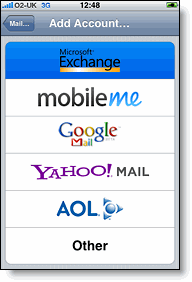
Many of you may know of Apple's MobileMe service. It has many features such as bookmark syncing, calendar syncing, online space and finding your lost iPhone. Now a MobileMe subscription costs around AU$119. It is completely ridiculous as I have found a way to easily get almost every feature for free and the few that cost, very cheaply.
iPhone Syncing
This feature is very easy. The first step is to make a Gmail account.
Settings>Mail, Contacts, Calendars>Add Account...>Microsoft Exchange
Then just plug in your email address and password. Your can ignore the domain. On the next screen, input the following settings:
Server: m.google.com
Domain: Leave this blank
Username: your email address
Then ensure Mail, Contacts and Calendars are on. When you press Done, press Keep on my iPhone. This should sync all your contacts, emails and calander information to your iPhone. If it does not work, feel free to email me at ravingsoftechnogeek@gmail.com. Lastly, in your Gmail, go into settings and then to Forwarding and POP/IMAP. Go down to "2. When messages are accessed with POP" and set it to "keep Gmail's copy in the Inbox".
I will continue Mac syncing, Windows syncing and Find my iPhone in the next few posts.
Sunday, June 27, 2010
Office 2010
Labels:
2010,
Excel,
Microsoft,
Office 2010,
point,
Power,
PowerPoint,
windows,
Word
1 comments
Well I said I would do this review well over two months ago but finally here it is. Office 2010 was released the other day without anyone really noticing. I had already made this video before it was released but I had some encoding troubles. The clicking sounds are because I had the wrong setting on the screen recorder program and it was supposed to be in HD but something went wrong there as well. Oh well. The actual programs are wonderful - it is the best version of Office by a mile.
Enjoy
AndrewCow

Friday, June 25, 2010
Vuvuzela
Hi
I just had to post about this today because it is very funny and I did not know how long it would stay.
Do you find something missing from your YouTube videos, something you have been hearing so much lately to live without it is a terrifying. Well, I'm sure most of you do not but oh well. YouTube has put a button in their player that allows you to play the joyful sound of the Vuvuzela behind, or more so on top of your videos. This feature is not in all videos, but here is an example. Now your life can be filled with annoying buzzing all day long:)
AndrewCow

Thursday, June 24, 2010
iOS4
Labels:
bug,
folders,
iBooks,
iOS4,
iPhone,
iPhone 4,
iTunes,
multitasking,
SIM,
sync,
sync issue
0
comments
Hi
So iOS4 was released a couple of days ago and the new iPhone 4 is due to be released in less than 24 hours. Now I have installed in on my iPhone 3G and had a play with it on my friends 3Gs. The first thing that comes to mind is how stupidly difficult it is to install. Now I know come people were fine and had it installed straight away but I had many issues installing it. Firstly, my phone had to go through a three hour backup before installing even though I had just backed it up 3 minutes before hand? There was no way to stop this and the disappointments
just kept on coming. After around 4 hours of installing, I finally got to the sync stage. This is where the major stuff up occurred.
So it tried to restore it to the 3 hour long backup and just couldn't. Error message after error message spewed out at me until I finally tried to sync it without restoring my original settings whereby my iPhone decided to think it did not have a SIM card. I took out and replaced the SIM card about 5 times and my phone decided it had a SIM card but the computer it was connected to decided to completely ignore it and refuse to Sync. So I took it over to a different computer which made my iPhone very angry and phone decided it did not have a SIM card after all. By the way I think I should mention at this point iOS4 still has not been installed. It was demanding I reconnect it to iTunes and do it again. So back to the other computer (which was a Mac which probably helped), I took out the SIM card once more and low and behold it actually decides to recognize it. So I managed to install iOS4 in the phone on that computer and then Sync it with my other computer finally.
So now I have it there are some things I am happy and sad about. Well actually many things I am sad about. Apple said there were a few features it had to leave out of the 3G version. I think my a few they mean almost every one. It does not support multitasking (which I already knew) , home screen wallpapers, accessibility options or screen orientation lock. I was so excited when they announced orientation lock as I have wanted it ever since I got my phone but nope:(.
Oh well. There were some things I did like such as iBooks, Spell Check(very useful for me), and Folders. iBooks is a very nice app but a very slow. When you eventually get to one of the many free books, the reading experience is very nice when put in low brightness and Sepia mode, which makes the background brown instead of white. It often will not connect to the iBooks store for no particular reason but that hopefully will be fixed soon. Spell Check is useful bit a bit hard to use at first. I eventually got use to it but the many combinations of tapping used for select, copy, paste and replace make using feature a challenge. Folders are very easy to use as all you need to do is drag one app on top of the other and you have it but with my 130 apps the fact you can only have 12 per folder is annoying.
Now most of these features worked far better on the 3GS I used but the owner complained about the annoyance of having to stop your apps as they all go into the Multitasking menu. The system Apple implemented for stopping these apps is slow and unnatural. They make you hold to app down for a couple of seconds before closing them which can get frustrating if there are 12 apps open. The switching between these apps is seamless though and very fast.
So it is probably he fact this OS was not really made for the 3G that frustrates me so but the upgrade is mostly excellent on the 3GS.
Thanks for reading
AndrewCow
p.s. I actually have made the Office 2010 review and seeing the retail version was released with out anyone noticing I will post that tomorrow but be warned it is not very good.

So iOS4 was released a couple of days ago and the new iPhone 4 is due to be released in less than 24 hours. Now I have installed in on my iPhone 3G and had a play with it on my friends 3Gs. The first thing that comes to mind is how stupidly difficult it is to install. Now I know come people were fine and had it installed straight away but I had many issues installing it. Firstly, my phone had to go through a three hour backup before installing even though I had just backed it up 3 minutes before hand? There was no way to stop this and the disappointments
just kept on coming. After around 4 hours of installing, I finally got to the sync stage. This is where the major stuff up occurred.
So it tried to restore it to the 3 hour long backup and just couldn't. Error message after error message spewed out at me until I finally tried to sync it without restoring my original settings whereby my iPhone decided to think it did not have a SIM card. I took out and replaced the SIM card about 5 times and my phone decided it had a SIM card but the computer it was connected to decided to completely ignore it and refuse to Sync. So I took it over to a different computer which made my iPhone very angry and phone decided it did not have a SIM card after all. By the way I think I should mention at this point iOS4 still has not been installed. It was demanding I reconnect it to iTunes and do it again. So back to the other computer (which was a Mac which probably helped), I took out the SIM card once more and low and behold it actually decides to recognize it. So I managed to install iOS4 in the phone on that computer and then Sync it with my other computer finally.
So now I have it there are some things I am happy and sad about. Well actually many things I am sad about. Apple said there were a few features it had to leave out of the 3G version. I think my a few they mean almost every one. It does not support multitasking (which I already knew) , home screen wallpapers, accessibility options or screen orientation lock. I was so excited when they announced orientation lock as I have wanted it ever since I got my phone but nope:(.
Oh well. There were some things I did like such as iBooks, Spell Check(very useful for me), and Folders. iBooks is a very nice app but a very slow. When you eventually get to one of the many free books, the reading experience is very nice when put in low brightness and Sepia mode, which makes the background brown instead of white. It often will not connect to the iBooks store for no particular reason but that hopefully will be fixed soon. Spell Check is useful bit a bit hard to use at first. I eventually got use to it but the many combinations of tapping used for select, copy, paste and replace make using feature a challenge. Folders are very easy to use as all you need to do is drag one app on top of the other and you have it but with my 130 apps the fact you can only have 12 per folder is annoying.
Now most of these features worked far better on the 3GS I used but the owner complained about the annoyance of having to stop your apps as they all go into the Multitasking menu. The system Apple implemented for stopping these apps is slow and unnatural. They make you hold to app down for a couple of seconds before closing them which can get frustrating if there are 12 apps open. The switching between these apps is seamless though and very fast.
So it is probably he fact this OS was not really made for the 3G that frustrates me so but the upgrade is mostly excellent on the 3GS.
Thanks for reading
AndrewCow
p.s. I actually have made the Office 2010 review and seeing the retail version was released with out anyone noticing I will post that tomorrow but be warned it is not very good.
Wednesday, June 16, 2010
PORTAL 2
Labels:
2,
portal,
portal 2,
valve
0
comments
I will not even bother trying to put in words the awesome of the greatest game ever created. Just watch.
AndrewCow

AndrewCow
Tuesday, June 15, 2010
New Tech of E3 and Apple!!!
Labels:
360,
720,
apple,
body,
Kinect,
mac,
mac mini,
Microsoft,
mini,
motion sensor,
Natal,
new,
Playstation,
Project Natal,
sony,
steve jobs,
unibody,
XBOX,
XBOX 360,
XBOX 720
0
comments
Hi
Well the first day of E3, the internationally renown gaming expo, has been full of major releases and announcements. Not all of these have come from E3 however - Apple, being the company they are, could never have a day of major announcements without one of their own. Not only did iPhone 4 pre-ordering start for countries were the device will be released on the 24th, the company released an update to the Mac Mini. The ultra small computer not only has a uni-body shell similar to the MacBook Pro, but also HDMI output and a SD card slot. I really like this upgrade as I have always wanted one - but not even more as Apple is exhausting its abilities as a media center device.
Microsoft finally fully unveiled their "Project Natal" device, dubbed the Kinect. This XBOX 360 add-on allows you to control games with motions, but unlike the Wii, it does not require a controller. This seems like another face palm for me. This device seems strikingly similar to the old EyeToy for the PS2 or Playstation Eye for PS3. The XBOX even had a version of these called XBOX live vision. All three devices sort of.....well...failed miserably. I seriously do not know why Microsoft thinks a better version of this 1999 technology will sell. There will be tonnes of people buying it in the beginning, but only because of media. Well at least that is what I think.
This device should be released in the US in November and has no price yet.
A motion sensor device for the PS3 is also in the works, although it uses a rather suggestive looking controller(the bottom pic). The Wii is a pretty awesome console and for so cheap its great but by the looks of it, Sony and Microsoft are trying to annihilate it.
Lastly....NEW XBOX !!!!! No, it is not the ridiculously named XBOX 720, it is still called the XBOX 360. The thinner version of the 360 has had a visual redesign as well as included Wifi (such a new concept). Personally I think too little (hardware wise) too late and.....it's sorta ugly....
It will be sold for $500 from July 1 in Australia.
Till next time :)
AndrewCow


Well the first day of E3, the internationally renown gaming expo, has been full of major releases and announcements. Not all of these have come from E3 however - Apple, being the company they are, could never have a day of major announcements without one of their own. Not only did iPhone 4 pre-ordering start for countries were the device will be released on the 24th, the company released an update to the Mac Mini. The ultra small computer not only has a uni-body shell similar to the MacBook Pro, but also HDMI output and a SD card slot. I really like this upgrade as I have always wanted one - but not even more as Apple is exhausting its abilities as a media center device.
Microsoft finally fully unveiled their "Project Natal" device, dubbed the Kinect. This XBOX 360 add-on allows you to control games with motions, but unlike the Wii, it does not require a controller. This seems like another face palm for me. This device seems strikingly similar to the old EyeToy for the PS2 or Playstation Eye for PS3. The XBOX even had a version of these called XBOX live vision. All three devices sort of.....well...failed miserably. I seriously do not know why Microsoft thinks a better version of this 1999 technology will sell. There will be tonnes of people buying it in the beginning, but only because of media. Well at least that is what I think.
This device should be released in the US in November and has no price yet.
A motion sensor device for the PS3 is also in the works, although it uses a rather suggestive looking controller(the bottom pic). The Wii is a pretty awesome console and for so cheap its great but by the looks of it, Sony and Microsoft are trying to annihilate it.
Lastly....NEW XBOX !!!!! No, it is not the ridiculously named XBOX 720, it is still called the XBOX 360. The thinner version of the 360 has had a visual redesign as well as included Wifi (such a new concept). Personally I think too little (hardware wise) too late and.....it's sorta ugly....
It will be sold for $500 from July 1 in Australia.
Till next time :)
AndrewCow
Friday, June 11, 2010
BAD GOOGLE
Labels:
2010,
background,
bing,
google,
Microsoft,
office,
picture,
Word 2010
2
comments
Oh come on Google, you can be better than that. If you don't know what I am referring to, just go to Google's homepage. Notice anything different? No, you have not accidentally gone to Bing, Google has just straight out copied them.
As many of you know, there are only 3 reasons people use Microsoft's Bing.
1. It is default in Internet Explorer
2. They do not like Google just on principal
3. It has pretty pictures
Earlier this week, Google took away their plain white site background and replaced it with some cool nature pics. There is no way to deny that Google copied them. That is just not how you do things - come on, you have so much original software but you just go and copy other people. You have no idea how disappointed I am with you.
AndrewCow
P.S. I SWEAR the Office 2010 review will be up sometime this weekend

As many of you know, there are only 3 reasons people use Microsoft's Bing.
1. It is default in Internet Explorer
2. They do not like Google just on principal
3. It has pretty pictures
Earlier this week, Google took away their plain white site background and replaced it with some cool nature pics. There is no way to deny that Google copied them. That is just not how you do things - come on, you have so much original software but you just go and copy other people. You have no idea how disappointed I am with you.
AndrewCow
P.S. I SWEAR the Office 2010 review will be up sometime this weekend
Tuesday, June 8, 2010
iPhone 4
Labels:
4,
apple,
bumper,
Fox,
HD,
iMovie,
iOS,
iOS4,
iPhone,
iPhone 4,
iPhone HD,
jobs,
Megan,
Megan Fox,
skype,
steve,
steve jobs
0
comments
Ravings of a Technogeek - every Monday, Wednesday and Friday......usually....except for 2 weeks when I am incredibly busy. I thought I should probably post about about the sexiest thing ever to come to the earth. I have included a photo of the past sexiest thing on the planet (Megan Fox) for comparison.
So, you have probably guessed, at 3am this morning, Apple started their press conference and released their latest iPhone - the iPhone 4. It turns out this was exactly the phone that was leaked, except this one seems really really really pretty. So apart from changing the looks, there are over 100 changes on the inside. I don't know all of them for sure, but Steve went through the main ones.
Firstly, it has the A4 chip, like the one in the iPad. This makes it very very very fast. They also managed to shrink everything so they could grow the battery. I'm very happy about this. I never really had a problem with my 3G's battery but .....faster.....longer battery ...what could be bad???
Another thing displayed and I think is AWESOME is the 4's ability to record 720p HD video. With its new 5mp camera it can take excellent pictures and its LED Flash (which can stay on while videoing), those pictures can be taken in the dark. Now you might think, as I did at first 'pfffft 5mp, thats nothing' well Apple has dished out some of their trademark jargon to convince us that 5mp is plenty. For once, it actually makes sense. You see.....I don't really understand it. It is something to do with the number of photons in each pixel...which sounds right... OH WELL :)
One of the reasons the iPhone 4 looks so brilliant is because of its display. Apple has implemented something called Retina Display Technology. What this means (I think) that, although the screen is only 640p, it has much smaller pixels. Text, photos, basically any curved lines are now much much smoother because there are more pixels making them up. I hope that whole bit actually made sense.
I could ramble on for hours about the 4's dual mics for noise cancellation, or the iMovie application making 720p movie editing being just one tap away, but I do not want to. There are, however, three more things I would like to focus on.
Firstly, Apple is trying to make a case, and it actually looks pretty good. It can be seen below and it is called the "Bumper". This is because it is more like a silicone, well...bumper bar, that fits around the aluminium edge of the phone, leaving the glass back and front exposed. You might be thinking. 'Great. Now I have two places to shatter my phone' but you would be wrong. Firstly, Apple has developed a glass that is apparently, stronger than plastic and sapphires. Secondly, the "Bumper" extends from the phone, like a regular case, meaning if you drop it, the case will hit the ground first.
Very quickly, it now has a gyroscope. This means it can sense movement as you turn, jump or be doing similar things to the accelerometer, but on more scales.
Lastly, the front facing camera wound have no point without video calling. FaceTime is a service built into the phone application that allows for excellent quality video calls. Unfortunately though, only between the iPhone 4s and, for the mean time, only over WiFi. This is quite surprising to me that they did not integrate iChat and allow it to talk to computers. I'm almost positive though Skype will be able to call to computers, be it a Mac or PC. What they are doing however, is attempting to make their way of doing video calling (e.g. codecs) universal, which means, someday, you might be able to call between iPhone 4s and HTC phones, or Nokias.
So there is much more I could say, but I will let the professionals say it for me. For way, way, way more information and videos, go HERE. This phone should be available in the US on June 24th, along with the renamed iOS 4 on June 21, free to all devices excluding the original iPhone and the 1st gen touch. The phone should be available in Australia some time in July. I will definitely be getting one and I will do a full review of it then.
Till next time,
AndrewCow
P.S. the Word 2010 video should be up this weekend:)


So, you have probably guessed, at 3am this morning, Apple started their press conference and released their latest iPhone - the iPhone 4. It turns out this was exactly the phone that was leaked, except this one seems really really really pretty. So apart from changing the looks, there are over 100 changes on the inside. I don't know all of them for sure, but Steve went through the main ones.
Firstly, it has the A4 chip, like the one in the iPad. This makes it very very very fast. They also managed to shrink everything so they could grow the battery. I'm very happy about this. I never really had a problem with my 3G's battery but .....faster.....longer battery ...what could be bad???
Another thing displayed and I think is AWESOME is the 4's ability to record 720p HD video. With its new 5mp camera it can take excellent pictures and its LED Flash (which can stay on while videoing), those pictures can be taken in the dark. Now you might think, as I did at first 'pfffft 5mp, thats nothing' well Apple has dished out some of their trademark jargon to convince us that 5mp is plenty. For once, it actually makes sense. You see.....I don't really understand it. It is something to do with the number of photons in each pixel...which sounds right... OH WELL :)
One of the reasons the iPhone 4 looks so brilliant is because of its display. Apple has implemented something called Retina Display Technology. What this means (I think) that, although the screen is only 640p, it has much smaller pixels. Text, photos, basically any curved lines are now much much smoother because there are more pixels making them up. I hope that whole bit actually made sense.
I could ramble on for hours about the 4's dual mics for noise cancellation, or the iMovie application making 720p movie editing being just one tap away, but I do not want to. There are, however, three more things I would like to focus on.
Firstly, Apple is trying to make a case, and it actually looks pretty good. It can be seen below and it is called the "Bumper". This is because it is more like a silicone, well...bumper bar, that fits around the aluminium edge of the phone, leaving the glass back and front exposed. You might be thinking. 'Great. Now I have two places to shatter my phone' but you would be wrong. Firstly, Apple has developed a glass that is apparently, stronger than plastic and sapphires. Secondly, the "Bumper" extends from the phone, like a regular case, meaning if you drop it, the case will hit the ground first.
Very quickly, it now has a gyroscope. This means it can sense movement as you turn, jump or be doing similar things to the accelerometer, but on more scales.
Lastly, the front facing camera wound have no point without video calling. FaceTime is a service built into the phone application that allows for excellent quality video calls. Unfortunately though, only between the iPhone 4s and, for the mean time, only over WiFi. This is quite surprising to me that they did not integrate iChat and allow it to talk to computers. I'm almost positive though Skype will be able to call to computers, be it a Mac or PC. What they are doing however, is attempting to make their way of doing video calling (e.g. codecs) universal, which means, someday, you might be able to call between iPhone 4s and HTC phones, or Nokias.
So there is much more I could say, but I will let the professionals say it for me. For way, way, way more information and videos, go HERE. This phone should be available in the US on June 24th, along with the renamed iOS 4 on June 21, free to all devices excluding the original iPhone and the 1st gen touch. The phone should be available in Australia some time in July. I will definitely be getting one and I will do a full review of it then.
Till next time,
AndrewCow
P.S. the Word 2010 video should be up this weekend:)


Subscribe to:
Posts (Atom)

