Many of you may know of Apple's MobileMe service. It has many features such as bookmark syncing, calendar syncing, online space and finding your lost iPhone. Now a MobileMe subscription costs around AU$119. It is completely ridiculous as I have found a way to easily get almost every feature for free and the few that cost, very cheaply.
iPhone Syncing
This feature is very easy. The first step is to make a Gmail account.
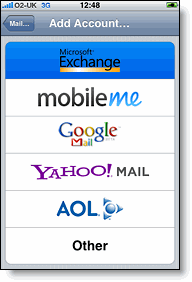
Settings>Mail, Contacts, Calendars>Add Account...>Microsoft Exchange
Then just plug in your email address and password. Your can ignore the domain. On the next screen, input the following settings:
Server: m.google.com
Domain: Leave this blank
Username: your email address
Then ensure Mail, Contacts and Calendars are on. When you press Done, press Keep on my iPhone. This should sync all your contacts, emails and calander information to your iPhone. If it does not work, feel free to email me at ravingsoftechnogeek@gmail.com. Lastly, in your Gmail, go into settings and then to Forwarding and POP/IMAP. Go down to "2. When messages are accessed with POP" and set it to "keep Gmail's copy in the Inbox".
I will continue Mac syncing, Windows syncing and Find my iPhone in the next few posts.