Showing posts with label iOS. Show all posts

Monday, October 4, 2010

Top 10 Non-game Apps

1 comments
Hey
I have finished my iPhone 4 review and it is sitting on my computer so i'll upload it tonight:) In the meantime, here is my top 12 non-game iOS apps. It was going to be 10 but then I could not decide. All of these apps are free by the way, or at least have free version.

1. Currency - this app might not interest everyone but it provides a simple, easy to use overview of any currency in the world.

2. Facebook - once again, not for everybody but come on. Who under 80 does not have Facebook.

3. Flashlight (icon below)- even if you don't have an iPhone 4, this app can be very useful. Flashlight allows you to use the flash as a torch or a strobe light. It also lets you turn the screen white like many other apps. If you do not have an iPhone 4 I recommend an app called flashlight (its icon has a green background with a torch on it) which allows you to turn the screen any colour. Turning it white illuminates anything.

4. TweetDeck - if you use twitter, you will live this app. It provides an excellent column view as well as a great interface for writing tweets and even connecting to Facebook.

5. Foxtel Guide - This is useless for you if you do not have Foxtel but if you do it is a must. It lets you record from anywhere in the world. If you have two boxes through multiroom you can even select which one to record on. Although this is only for Australia, i'm pretty sure cable networks in other countries have apps similar to this one including TiVo.

6. Authenticator - Only useful if you play World of Warcraft but if you do, it lets you use your phone as a Remote Authenticator, which prevents hacking.

7. USB Disk - This allows you to do what you can't with an iPhone of any kind, use it an a USB like you can with iPods...sort of. It only works if you have iTunes on both computers, but you can load any file on to it through iTunes, view it on your iPhone, then offload it on another computer.

8. Remote - This Apple application, not pre-installed simply allows control of your iTunes library from anywhere in your house, as long as you have iTunes.

9. PandoraBox - Its a bit complicated to use, but if you can it is great, and could save you a lot on money. It shows free apps that are free for a limited amount of time. Just go On Sale(down the bottom) then click free(up the top).

10. Consume - this app can be a tad buggy at times but it shows data usage and call usage for many networks.
  
11. Snow Report - useless if you are not interested in skiing but if you are it provides unprecedented coverage of slopes all over the world.

12. Sound Hound - this app lets you identify not only recorded songs, but also that one stuck in your head when you sing it. Its free version lets you identify only a couple of songs per month but for most people, this is enough.

A friend also told me to mention Eurosport and iFittness, which will cater for all your sports news and workout plans respectively. 

So till next time
AndrewCow
Tuesday, June 8, 2010

iPhone 4

0 comments
Ravings of a Technogeek - every Monday, Wednesday and Friday......usually....except for 2 weeks when I am incredibly busy. I thought I should probably post about about the sexiest thing ever to come to the earth. I have included a photo of the past sexiest thing on the planet (Megan Fox) for comparison.


So, you have probably guessed, at 3am this morning, Apple started their press conference and released their latest iPhone - the iPhone 4. It turns out this was exactly the phone that was leaked, except this one seems really really really pretty. So apart from changing the looks, there are over 100 changes on the inside. I don't know all of them for sure, but Steve went through the main ones. 


Firstly, it has the A4 chip, like the one in the iPad. This makes it very very very fast. They also managed to shrink everything so they could grow the battery. I'm very happy about this. I never really had a problem with my 3G's battery but .....faster.....longer battery ...what could be bad???


Another thing displayed and I think is AWESOME is the 4's ability to record 720p HD video. With its new 5mp camera it can take excellent pictures and its LED Flash (which can stay on while videoing), those pictures can be taken in the dark. Now you might think, as I did at first 'pfffft 5mp, thats nothing' well Apple has dished out some of their trademark jargon to convince us that 5mp is plenty. For once, it actually makes sense. You see.....I don't really understand it. It is something to do with the number of photons in each pixel...which sounds right... OH WELL :) 


One of the reasons the iPhone 4 looks so brilliant is because of its display. Apple has implemented something called Retina Display Technology. What this means (I think) that, although the screen is only 640p, it has much smaller pixels. Text, photos, basically any curved lines are now much much smoother because there are more pixels making them up. I hope that whole bit actually made sense.


I could ramble on for hours about the 4's dual mics for noise cancellation, or the iMovie application making 720p movie editing being just one tap away, but I do not want to. There are, however, three more things I would like to focus on.


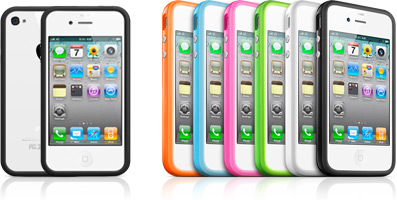
 Firstly, Apple is trying to make a case, and it actually looks pretty good. It can be seen below and it is called the "Bumper". This is because it is more like a silicone, well...bumper bar, that fits around the aluminium edge of the phone, leaving the glass back and front exposed. You might be thinking. 'Great. Now I have two places to shatter my phone' but you would be wrong. Firstly, Apple has developed a glass that is apparently, stronger than plastic and sapphires. Secondly, the "Bumper" extends from the phone, like a regular case, meaning if you drop it, the case will hit the ground first. 


Very quickly, it now has a gyroscope. This means it can sense movement as you turn, jump or be doing similar things to the accelerometer, but on more scales.


Lastly, the front facing camera wound have no point without video calling. FaceTime is a service built into the phone application that allows for excellent quality video calls. Unfortunately though, only between the iPhone 4s and, for the mean time, only over WiFi. This is quite surprising to me that they did not integrate iChat and allow it to talk to computers. I'm almost positive though Skype will be able to call to computers, be it a Mac  or PC. What they are doing however, is attempting to make their way of doing video calling (e.g. codecs) universal, which means, someday, you might be able to call between iPhone 4s and HTC phones, or Nokias. 


So there is much more I could say, but I will let the professionals say it for me. For way, way, way more information and videos, go HERE. This phone should be available in the US on June 24th, along with the renamed iOS 4 on June 21, free to all devices excluding the original iPhone and the 1st gen touch. The phone should be available in Australia some time in July. I will definitely be getting one and I will do a full review of it then. 


Till next time,
AndrewCow


P.S. the Word 2010 video should be up this weekend:)